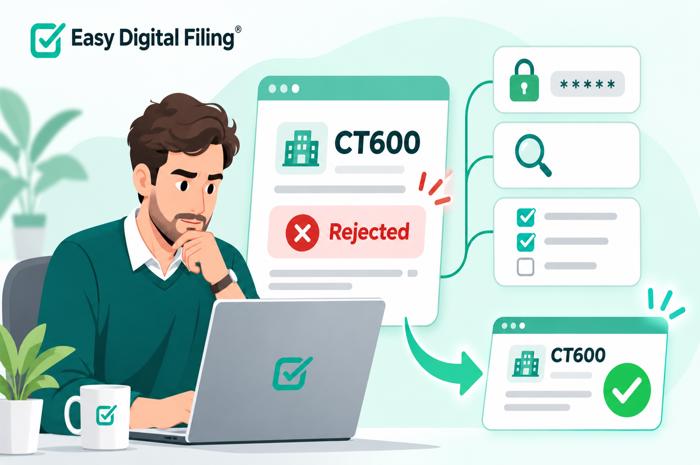
Submitting a Company Tax Return (CT600) to HMRC can occasionally end in a rejection. It usually happens when information is missing, inaccurate or doesn't match HMRC's records. The good news is that most CT600 rejections are easy to fix once you know what caused them, and knowing the usual culprits can save you unnecessary delays. Before you contact HMRC, work through the checks below.
The 1046 rejection
The most common rejection when filing a CT600 is the 1046 rejection. It appears when the credentials used to submit the return are incorrect or aren't recognised by HMRC.
How to resolve a 1046 rejection
1. Check your Unique Taxpayer Reference (UTR). Make sure the UTR you submitted is accurate and matches HMRC's records for the company. You can find it on previous tax returns and other HMRC documents, such as a notice to file a company tax return or a payment reminder or your government gateway account.
2. Confirm your Government Gateway User ID and password. Try signing in directly to your company account through HMRC's Government Gateway. If you can't sign in, you may need to reset your login details.
3. Make sure the Corporation Tax service is added and activated. This is the most common reason for a 1046 rejection error: the Gateway account simply doesn't have the Corporation Tax service added, or it hasn't been activated. If you can see Corporation Tax listed among the services on your Gateway account, it is already active. If you can't see it, you'll need to add the service and request an activation code.
After you select add service, HMRC posts the activation code to you, which can take up to 10 days. Once it arrives, enter the code in your company HMRC's government gateway account to activate the service.
Filing as a partnership? The nominated partner must log in to their Government Gateway account and make sure the Self Assessment tax service is activated. To do this, select "Get online access to a tax, duty or scheme", then request an activation code, which will activate the service.
4. Check whether an accountant's agent account is still linked. If an accountant has previously filed a return for the company, they may have used their own agent account. Your UTR can then remain linked to the accountant's agent ID. If that's the case, you'll need to contact HMRC and ask them to remove the link (deauthorise) between the UTR and the accountant's agent ID. HMRC can normally do this while you're on the phone. You can reach them through the HMRC Corporation Tax enquiries page.
Rejections when filing an amended return
An amended corporation tax return can also be rejected if it contains data that is wrong or incomplete, or if it doesn't meet the necessary filing requirements. To avoid delays and make sure the amendment is processed correctly, check every figure carefully before you resubmit.
Set Box 38 to "YES"
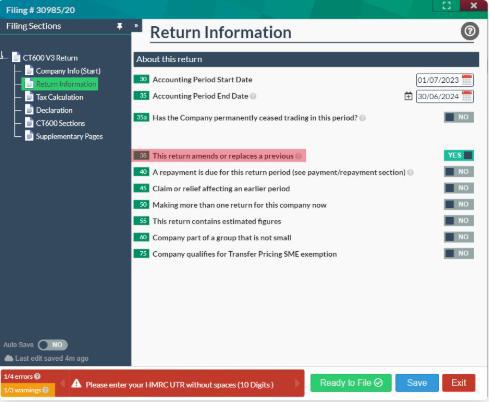
Before submitting, go to the Return Information tab and set Box 38 to YES. This tells HMRC that the return is replacing or modifying the previous CT600 return. Forgetting to tick YES is one of the most frequent mistakes people make when submitting an amendment, and if Box 38 isn't updated correctly, your filing will be rejected or delayed.
Submitting an amendment through Easy Digital Filing
If you need to change your micro or small accounts in Easy Digital Filing (EDF):
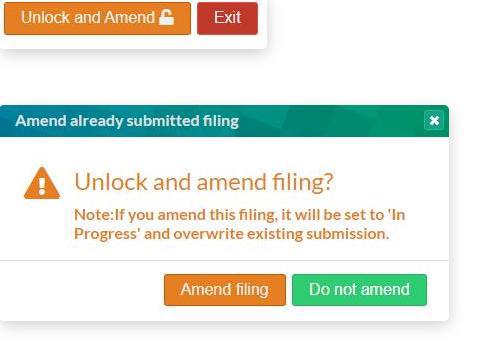
- Open the filing and select the orange Unlock and Amend button.
- A small box will appear asking whether you want to continue. Select Yes.
- Make the changes you need.
- Set the accounts back to Ready to File (the green button).
- Before submitting, check the Return Information tab and make sure Box 38 is set to YES.
Amending a return for your first year of filing
The process is slightly different if you want to file an amended CT600 for your company's first period. Even with Box 38 set to YES, you may receive a rejection or error message when you submit the updated return. The error will read "Original return already received for the period".
If you see this message, you'll need to contact HMRC and ask them to remove (unlog), your first submission from their system. HMRC can normally do this easily by phone. Once your original submission has been removed, you can file your CT600 as a new return.
Key takeaways
- A 1046 rejection always points to a credentials or Gateway set-up problem, not a problem with the figures in your return.
- Start with the basics: check your UTR, then your Gateway login, then whether the Corporation Tax service is activated.
- Allow up to 10 days for an activation code to arrive by post, so don't leave it until the filing deadline.
- If an accountant filed the company tax return before, ask HMRC to remove the old agent link.
- When filing a corporation tax amendment, set Box 38 to YES on the Return Information tab, or the filing may be rejected or delayed.
- If you're amending your first-period return and see "Original return already received for the period", call HMRC to have the first submission removed, then file again as a new return.
- For amendments, review all data before resubmitting, and use Unlock and Amend in EDF to make changes safely.