
What is a Confirmation Statement?
A Confirmation Statement, also known as the CS01, is a statutory document which is submitted to Companies House which validates that the information held at Companies House is up-to-date. This is not to say that the Confirmation Statement must confirm every detail held by Companies House, but instead the Confirmation Statement confirms the following basic details about the entity:
- Its Registered Office Address
- Its Current Company Officers - (Both company secretaries & directors)
- Its standard industrial classification (SIC) code
- Share Capital
- Shareholders (LTD) or Members (LLP)
When are Confirmation Statements due?
A Confirmation Statement is due to be filed at least once per annum (every 12 months), but the due date for submitting your entity's confirmation statement is different for every company. Typically a Confirmation Statement is required to be filed on the 12 month anniversary of the entity's previous Confirmation Statement.
This 12 month anniversary is also referred to as a statement date which simply put is the end date of the 12 month review period. If your company has just been incorporated then its statement date will be the day before the anniversary of its incorporation date. Then the entity in question has 14 days after the statement date to submit the Confirmation Statement to Companies House.
We will now walk through some examples of when a confirmation statement should be submitted assuming you are filing for a newly incorporated company as well as for an existing company:
Example for a newly incorporated company
A company incorporated on 24th of March 2024 will have its 12 month review period starting on 24th March 2024 and ending on 23rd March 2025. Therefore, the statement date of the company’s first Confirmation statement is the 23rd March 2025 and the filing deadline will be 14 days later, hence on 6th April 2025.
Important Note - entities can file their confirmation statement at any point during its 12 month review period and as often as they wish to update the information on the register, although, after a confirmation statement is filed, this then begins a new 12 month review period and thereby update their filing due date.
Example for an filing a confirmation statement early
If the Confirmation Statement is filed earlier than the end of the 12 month review period (for example on 9th of June 2024), then this is will start a new review period, therefore the next period will begin on 10th of June 2024 and will end on 9th June 2025, meaning that the next confirmation statement date will be 9th June 2025 and be due by 23 June 2025 (14 days later).
Where can I view my up-to-date Confirmation Statement deadline?
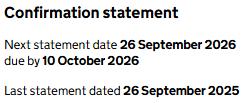
Due to the ever changing nature of the confirmation statement deadlines, you are able to view all companies due date on the Companies House website. Simply search the name of the company that you wish to review the confirmation statement date and due date for and then it will be visible as shown below:
If you wish you can sign up for email reminders from Companies House which will notify you when your company's accounts and confirmation statements are due by sending you an email.
What company information changes can you make when filing a Confirmation Statement?
You can update the following through the submission of a standard confirmation statement:
- Standard industrial classification (SIC) codes
- Statement of capital
- Shareholders’ details
Although, to change details with regards to officers' personal details (CH01 form), persons with significant control (PSC04) and the registered office address (AD01) of the company which have previously been reported to Companies House, then this would need to be completed through the completion of other Companies House forms.
Key things to remember before filing your Confirmation Statement
- All of the directors of the company must have their identity verified before submitting their confirmation statement
- Only 1 of the verified director's verification numbers would be required in order to submit the confirmation statement
- The verification number should be 11 characters long and can contain both letters and numbers
- The name and date of birth entered must match the full name and date of birth which has been verified to Companies House for that specific
How to file a Confirmation Statement through EasyDigitalFiling?
Submitting your confirmation statement is quite straight forward and it should not take more than 10 minutes to submit! It can be done in a few easy to follow steps, which we have outlined below:
Step 1 - Log in to your EasyDigitalFiling account or sign up here and find your company that you wish to file the confirmation statement for
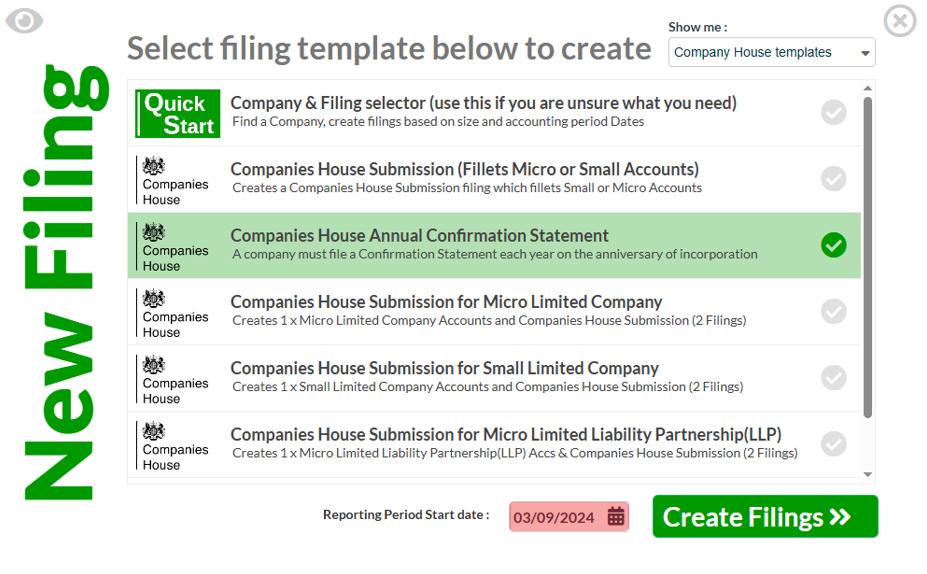
Step 2 - After you have selected your company and are on the 'Filings View' page, click on the blue 'Add Filing' button at the top right of your screen and use the 'Show me' filter to select 'Companies House templates' then choose the 'Companies House Annual Confirmation Statement' package

Step 3 - Double check the 'Reporting Period Start date' and click on 'Create Filings'
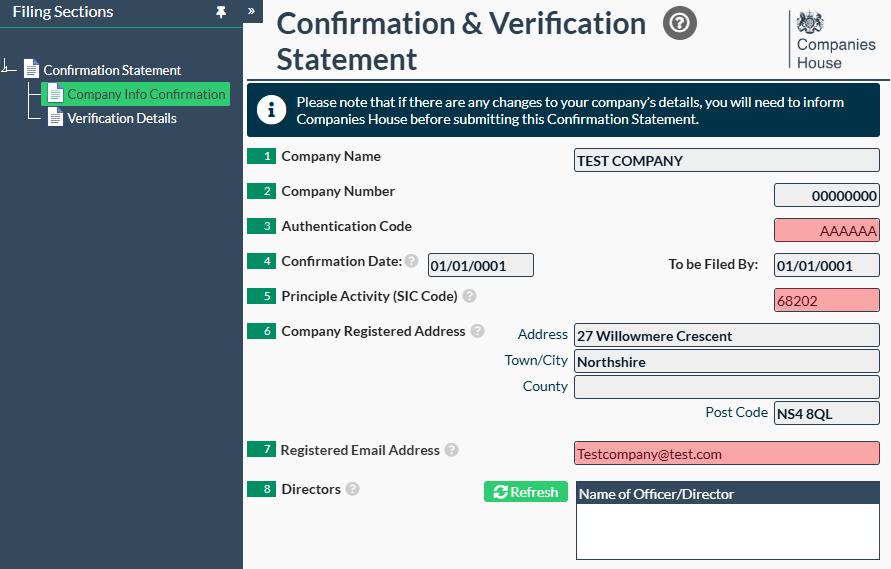
Step 4 - Open up the confirmation statement template head to the 'Company Info Confirmation' page. Here you should double check the pre-populated information within the boxes which are shaded in grey.
Step 5 - If all the pre-populated details are correct you can then enter the entities Companies House Authentication Code into Box 3, ensure that the standard industrial classification (SIC) Code is correct within Box 5 (if you wish to change this then enter the updated 5 digit SIC code into Box 5) and its desired registered email address into box 7.
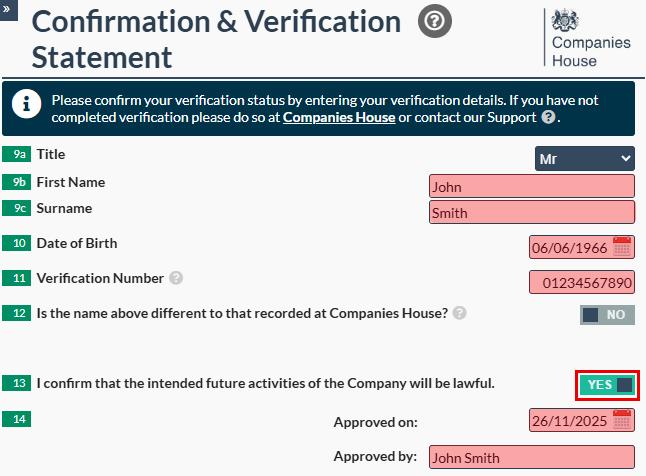
Step 6 - With the newly introduced Identity Verification, there is now a new section to the confirmation statement. This can be accessed within your template by clicking 'Verification Details' in the left hand tool bar.

Step 7 - To complete the new 'Verification Details' page, start by selecting your title in Box 9a, then proceed by entering your first name (Box 9b) and Surname (Box 9c). Note - The names entered must match those provided to Companies House when verifying your identity. Within Box 10 you should enter the 11-character unique Verification Number of the given officer who is filing the return. If you have not verified your identity yet, we can do this for you and here is where you can find out more. The last boxes which would need to be completed is the ticking of Box 13 to 'Yes', confirming the intended future activities of the company will be lawful and within Box 14 enter the date the confirmation statement was approved and the name of the individual who approved it.
Step 8 - Once you are ready to submit your Confirmation statement – you will need to set the filing to ‘Ready to File’ and then click on the flashing arrow in the ‘Submit/Result’ column in order to submit.


And just like that you are done! In 8 quick steps you would have successfully submitted your confirmation statement to Companies House. This will be confirmed from the updated filing status showing as 'Accepted by Companies House'!
What happens if a limited entity does not file its Confirmation Statement?
All private limited companies, as well as limited liability partnerships, whether active or dormant must submit confirmation statement to Companies House at least once a year. Failing to submit annual Confirmation statement is a criminal offence, and although there is no financial penalty charge that is imposed for filing after the deadline, if the confirmation statement is not filed at all, Companies House will start legal proceedings against the company and its directors with the final phase being the dissolution (removal) of the entity from the Companies House register. Even if there are no changes to report, a confirmation statement must still be filed to Companies House as this will indicate that the company’s details held are correct.
Would you rather we completed the Confirmation Statement on your entities behalf?
In case you are tight for time or would like to have someone prepare the confirmation statement ensuring it has been completed in accordance with Companies House's requirements we provide a Managed Confirmation Statement through our software.
This is where a member of our Accounts Specialist team will complete the return on the entities behalf, taking away the stress of completing another regulatory return for your entity. Your account specialist will email you asking you to confirm a couple of details before putting your confirmation statement into review. With your approval, and only with your approval will your Account Specialist then submit your confirmation statement to Companies House through our software.