What is an LLP?
An LLP (Limited Liability Partnership) is a company that combines elements of incorporated companies and partnerships. It allows partners to have the flexibility of a partnership along with limited liability protection that is similar to that of a corporation. Within an LLP, each partners’ liability is restricted to amount that they have invested in to the company. This typically means, that their personal assets are shielded from the debt and liabilities of the company.
Limited Liability Partnership Accounts:
Like any other business, an LLP is required to record and submit their financial records and statements – these are known as LLP accounts. These accounts provide a summary of the LLP's financial status and are essential for taxation, compliance, and communicating the firm's financial position
How to file through our software:
Preparing your filings:
The first step in preparing your filings, is to ensure that an accurate and current financial record has been kept throughout the filing period. All financial transactions such as income, expenses, assets and liabilities should be carefully documented. Maintaining accurate records guarantees more accuracy of the numbers in your accounts and simplifies the filing procedure. For Micro LLP's, this typically entails creating a basic balance sheet with few notes. For Small LLP's, a balance sheet, profit and loss account, and more detailed notes will be needed. These notes can typically include member loans and related-party transactions.
Maintaining clear records (such as bank statements, invoices and receipts) not only simplify the filing process but also serves as proof in the event of an HMRC audit or inspection. Furthermore, keeping regular records throughout the year lowers the possibility of mistakes and stress at last minute when it is time to submit your filings.
How to file through our software:
Filing your LLP accounts and tax returns to Companies House and HMRC in one place is possible with Easy Digital Filing. Let's start by walking through the steps:
Select "Partnerships" from the "show me" product filter, then click "add filing" (the blue button in your account's upper right corner). After that, "Companies House Submission for Micro/Small Limited Liability Partnership (LLP)" should appear. After selecting the appropriate option, please input the start date of the reporting period and choose "create filings," depending on the company's size.
To recap;
Your company will be a micro-entity if it has any 2 of the following:
• a turnover of £1 million or less
• £500,000 or less on its balance sheet
• 10 employees or less
Your company will be ‘small’ if it has any 2 of the following:
• a turnover of £15 million or less
• £7.5 million or less on its balance sheet
• 50 employees or less
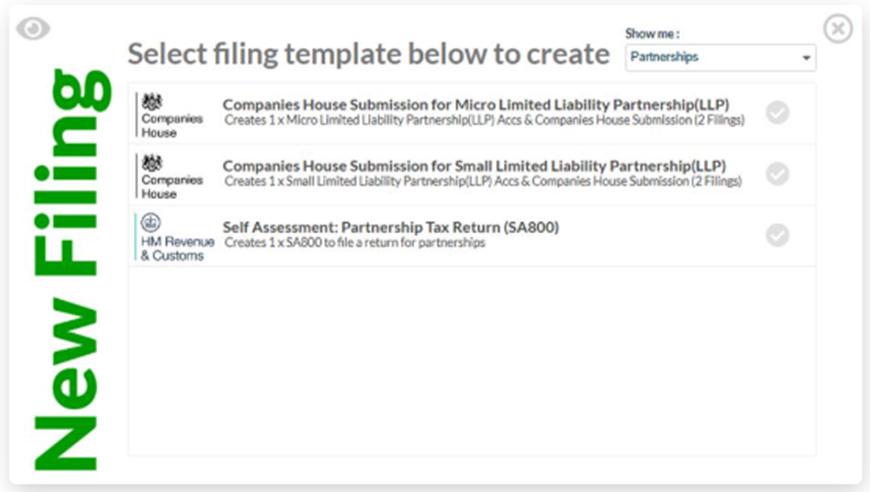
You should then be able to see two templates in your account: The LLP Micro Accounts for Companies House and the Companies House accounts. For Companies House, you are only required to send in the balance sheet from the accounts (abridged accounts), providing all partners agree to this.

The LLP Information, balance sheet, and balance sheet note must all be completed within the micro accounts. When you are prepared to submit, click the green "ready to file" button after selecting "save."
Next, open the Companies House accounts submission filing and enter the Companies House authentication code in box 705 and attach the completed LLP micro accounts in box 700 if you haven't previously. After that, you can select save and make this "ready to file."
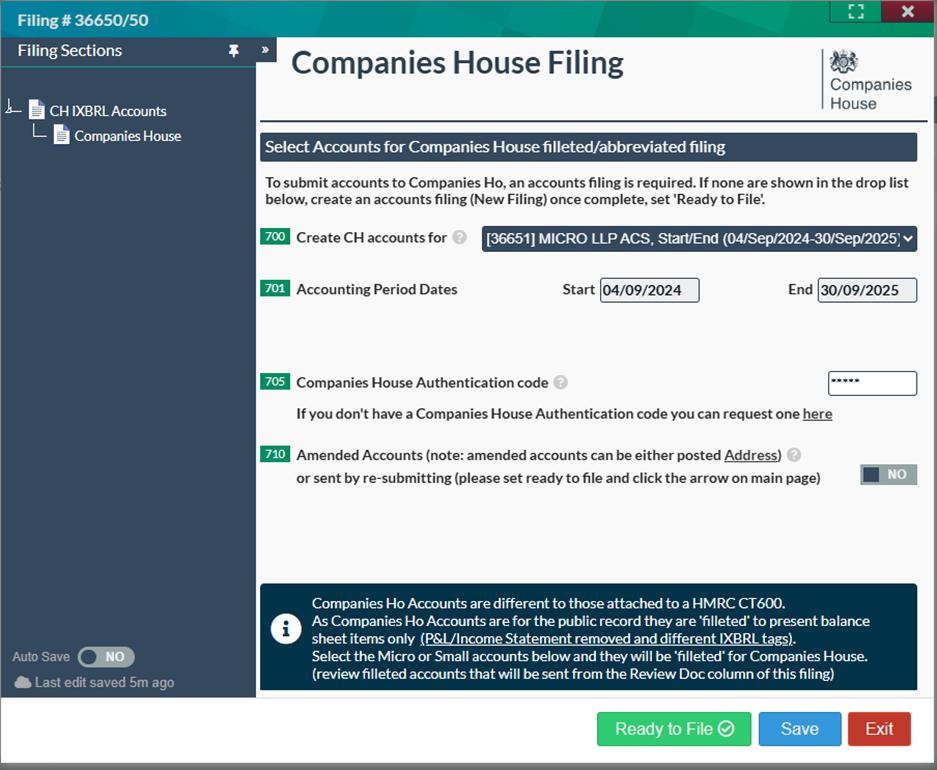
Your Companies House accounts submission is complete when you click the flashing red arrow in the submit/result column.

After reading our guide on preparing accounts for an LLP, you’ll hopefully be confident enough to handle them yourself! Our software is free up until the point of submission, so please feel free to create an account with us, which you can do here: https://easydigitalfiling.com/public/register and test out our software filing templates to start filing your LLP accounts with ease today!
For more information on how to file your SA800 to HMRC, please follow this link: https://easydigitalfiling.com/kb/understanding-limited-liability-partnerships-llps