
What is a creative tax credit?
A creative tax credit claim is a type of tax relief that business can claim on their corporation tax return where they can claim enhanced expenditure on relevant costs, which in turn either reduces their corporation tax due for the period, or they can even receive a tax credit payout. Creative tax credits were introduced for businesses who are in the creative industry, whether you are a production company for film or music, an art gallery or museum, or even an orchestra, and all the relevant costs you can claim on must have been spent on projects related to the industry.
It is important to note that this type of tax relief claim is only available for companies that are liable to corporation tax, as the credit claim can only be used to reduce corporation tax or to be paid out as a tax credit, rather than enhancing a company’s losses that they can then carry forward. If a company is loss making, then a notional tax charge is applied instead, for certain claims. Companies must also be directly involved in all aspects of the project, from production to decision making, etc., in order to be eligible for the claim. There are also additional criteria that the company must meet which is dependent on the sector the business operates in, so it is important to ensure you are eligible before making your claim.
How to claim a credit if your accounting period starts before 1st April 2025:
From the 6th April 2026 onwards, HMRC introduced a new way to claim creative tax credits, which is through the CT600P form. Prior to this, you simply completed the creative tax boxes within the CT600 corporation tax return itself, rather than completing an additional supplementary form. As the credit claim changed for periods starting from the 1st April 2025 onwards, there are separate boxes within the supplementary form depending on the dates your period falls across.
If you’re accounting period starts before the 1st April 2026, then you will need to switch on the ‘Creative Tax Credits (CT600P) For periods starting before 1/4/2025’ which can be found in the ‘Supplementary Pages’ tab of the CT600 corporation tax return template.
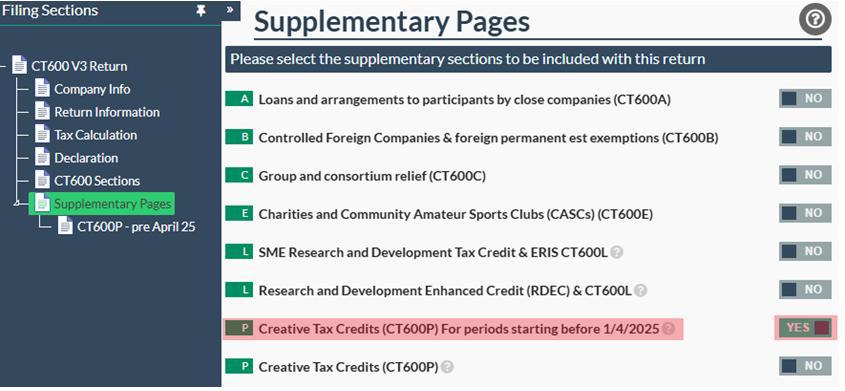
This will create a form within the template where you can complete only the boxes that are relevant for creative tax claims for periods starting before the 1st April 2025.
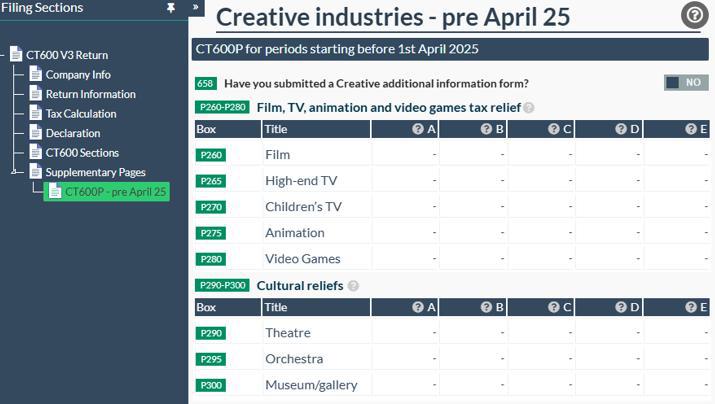
In this section of the CT600P, Boxes P260 to P280 are for film, TV, animation, and video games tax relief claims, whereas boxes P290 to P300 are for cultural reliefs which includes theatre, orchestra, and museum/gallery claims. You just need to complete boxes A through E for the relevant claim you are making. Box A should include the total global core expenditure incurred within the period; box B should include the total UK core expenditure incurred in the period; box C should include the amount of additional deduction received; box D should include the total amount of losses the company is surrendering for the tax credit; and finally, box E is the actual tax credit amount that you are claiming. There are a few key points to note on this claim - the first is that the figure in box B must not be greater than the figure in box A, and the second is that all boxes A-E must include a figure in it in order to make the claim. If one of the boxes has not been completed, then it is likely that you will receive a rejection from HMRC.
It is also important to note that you must still complete the additional information form, which is to be submitted to HMRC before you submit the creative tax claim within the CT600P form itself. This must be submitted regardless of whether your accounting period starts before or after the 1st April 2025.
How to claim a credit if your accounting period starts after 1st April 2025:
As mentioned, the creative tax credit claim changed in April 2026, meaning that if you are filing a claim for a period that starts after the 1st April 2025, there are separate boxes within the CT600P form that you must complete. To access these boxes, you simply need to switch box P ‘Creative Tax Credits (CT600P)’ to Yes within the ‘Supplementary Pages’ tab within the CT600 corporation tax return template in our software.
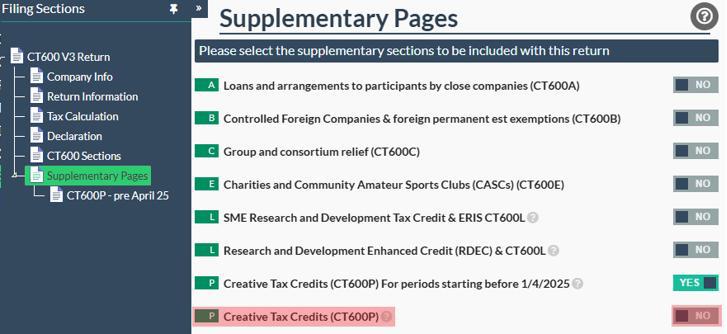
Once this box has been switched on, you will see the form to the left - click on this to open the page. You will see that the form is similar to the RDEC form in that there are different steps that you need to complete in order to receive a tax credit pay out.
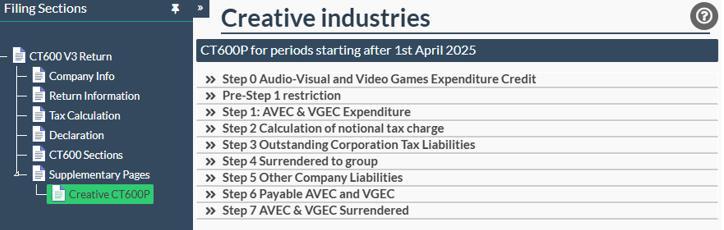
You can click on each of the steps to expand them and fill in the boxes wherever relevant. Step 0 is similar to the CT600P claim form for periods starting before the 1st April 2025, as you must complete the chart by adding the type of project you are making the claim on and entering the relevant expenditure for the period.
In boxes P5 to P25, you can add the claims that fall under the Audio-Visual Expenditure Credit, which includes film, high-end TV programmes, children’s TV programmes, animation, and independent film. In boxes P35, you can add the claims that fall under the Video Games Expenditure Credit instead, which covers video games only. In box A, you need to enter the global expenditure incurred in the accounting period; in box B, you need to enter the total UK relevant expenditure; in box C, you need to enter the qualifying expenditure for the period; in box D you ned to enter the expenditure credit claimed for the period; and for AVEC claims only, in box E you need to enter any additional credits for visual effects for the period.
For the remaining steps of the CT600P, here is an overview of what is included:
- Pre step 1 restriction - this section must be completed if you have a step 2 restriction brought forward from a previous accounting period and you wish to include an amount of AVEC or VGEC credit that was surrendered from other group companies.
- Step 1: AVEC & VGEC Expenditure - This step involves using the expenditure credit arising in this accounting period to offset against any corporation tax due for the period that is still arising.
- Step 2: Calculation of notional tax charge - This step involves applying a notional tax charge to the credit if it has not been reduced already by the corporation tax charge, which is to ensure that companies that are loss making receive the same benefit as companies that are profit making.
- Step 3: Outstanding Corporation Tax Liabilities - At this step, any amounts that are remaining are used to offset against any outstanding corporation tax liabilities for the company for any accounting periods, not just the one you are filing for.
- Step 4: Surrendered to group - If a company is part of a group, then they can choose surrender some or all of its amounts that remain after Step 3 to any other group member, but this is optional.
- Step 5: Other Company Liabilities - At this step, any amounts remaining are used to offset against any other liabilities that the company still owe, which could be VAT or other.
- Step 6: Payable AVEC and VGEC - The final amount that remains at this step is the creative tax credit payable to the company, as long as the company is not in administration or liquidation when the CT600 return is submitted.
- Step 7: AVEC & VGEC Surrendered - If you are choosing to surrender your credit to another company, then you can enter their details and amount you are surrendering, in this section.
What additional information is needed for a creative tax credit claim?
Completing the CT600P is only one part of making a creative industries tax relief or expenditure credit claim.
Companies must also complete HMRC's additional information form to support their claim. This information must be submitted before or on the same day as the Company Tax Return.
Depending on the type of production, the information required can include:
- Details of the production
- Details of the company's involvement
- Qualifying expenditure
- UK and non-UK expenditure
- A breakdown of qualifying costs
- Cultural certification
- Details of connected-party transactions
- Other supporting information relevant to the particular relief
For example, HMRC requires supporting information such as cultural certification and expenditure details for certain film, television and video game claims.
How do I submit a creative tax credit claim?
Once you have completed the relevant sections of your Corporation Tax return, CT600P and additional information form, you can submit your claim to HMRC.
- Before submitting, make sure that:
- Your company is eligible for the relevant creative industries tax relief or expenditure credit.
- You have calculated your qualifying expenditure correctly.
- The relevant CT600P sections have been completed.
- Your additional information form has been submitted.
- The figures on the CT600, CT600P and supporting information are consistent.
- You have completed the other relevant sections of your Corporation Tax return.
If you are using Easy Digital Filing, you can complete the relevant creative industries forms within your Corporation Tax return and submit the return electronically to HMRC. For more guidance on how to complete this, you can check out our article What is a CT600 return?
Once you have filled out the relevant boxes within the template and completed your additional information form, then you are ready to submit your creative tax claim! Simply set the filing as Ready to File and click on the flashing arrow next to it to submit your return to HMRC.